
MyChildAtSchool (MCAS) is a FREE app that enables parents to view their child’s performance at school in real time.
It provides anytime access to Attendance, Behaviour, reports, letters or important documents. Student timetables alongside the school calendar and Exam Timetables and results mean The Radclyffe School can keep parents/carers fully informed electronically.
The app also provides two way communication between the school and parents/carers so we can keep you informed about important events in school that involve your child, but also provide you with a way of easily contacting the school when you need to do so.
The MyChildAtSchool app will replace the Cloud School Parent app immediately, and will also replace the MyEd app.
Parents/carers are strongly encouraged to download the app as soon as possible so that you are setup and ready for the new academic year.
Instructions on how to install the app and get logged in are below.
We have also created a video for parents which provides a brief introduction to the app and runs through the main features of the app. This can be viewed below.
Downloading the app
Click on the relevant link below to be directed to install the app from either the Google Play Store or the Apple App Store.


We are aware that the MCAS app has recently received a makeover in its user interface and the video below no longer reflects the MCAS interface now available. The new interface is easy to navigate and we hope you will be able to navigate it without any additional guidance.
The login process remains similar to that detailed in the video below so this video will remain available to support those who have yet to login, and we hope to release an updated video guide soon.
Video Guide
Logging into the app
Before you login to the app for the first time you will need to set your password. To do this either click on the link in your MCAS welcome email or, if you have not had an email, open the app, click on “Forgot Password?” and follow the instructions.

If asked to enter your email address, please ensure you enter the email address you have registered with The Radclyffe School on the contact information for your child. If you have forgotten the email address you have registered with us, please email mcas@theradclyffeschool.co.uk, include your name, a contact number and the name and date of birth of any of your children who attend The Radclyffe School.
Once you have set your password, go back to the app and enter your email address and password into the login page.

If parents have more than one Profile using the same Email Address, a popup will appear, select the Profile they wish to use to continue to the Dashboard.
The Dashboard will then open for the chosen Profile.
How to select the MCAS Dashboard
The MCAS Dashboard allows parents to view multiple Student MCAS accounts in one place.
All Students linked to a parent account will appear in the top left dropdown in the Dashboard with School and Student Name. This dropdown allows parents to switch between different Student accounts. Click on the required Student and click “Select”.

Accessing each area
You can now access each area of your child’s information by clicking on the “menu” icon in the top left (3 horizontal lines) and then selecting the data area you want to view.
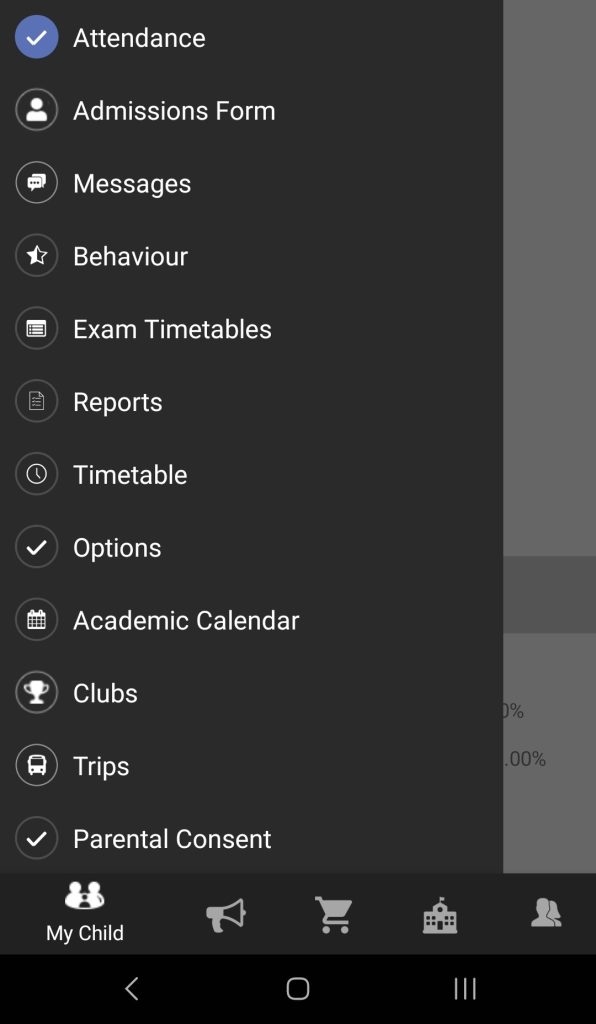
Editing your MCAS Profile
You can change the settings on your login profile by clicking the “Profile button on the bottom menu.

From here you can change your password, app pin and enable/disable biometrics to enable easy and secure access to the app.

If you have any issues or questions, please email us on mcas@theradclyffeschool.co.uk